
Password Management with KeePassXC
Password Management with KeePassXC
Ello and welcome to today’s guide Today you are gonna learn about KeePassXC
Why use a Password manager???
The biggest dangers against your accounts is reusing passwords and forgotten credentials! A password manager lets you keep all your accounts organized with different passwords for each, you can even use very long complex completely random passwords, easily hitting the max length allowed on most sites!!
Is this not risky as storing all your eggs in one basket??
Not really nowadays. Your passwords are encrypted and stored only locally on your device with KeePassXC. So from getting hacked standpoint the risk is very large. It is a bigger risk to lose access to your database of passwords, which can be mitigated by storing it on multiple devices at your home! Like for example using the 3 2 1 backup rules( storing the password in 3 copies on 2 different types of things like an usb stick and a hard drive and 1 in an off site location ) You should also write down your password databases master passphrase on a piece of paper and store said paper in a safe location.
What about multi factor authentication???
For your password database it is a good idea to have a key file at minimum that you store on a removable usb stick that is only inserted when you need to use your passwords. Alternatively if you have a yubikey you can set that up to be used with KeePassXC in challenge response mode to better protect your database. But what about storing your multi factor authentication codes that use timebased one time pin:s??? Shadow would recommend against storing these in your database but following the steps earlier and later in this guide you will most likely still be safe!
Pass Phrases vs Passwords
For your key to login into KeePassXC shadow recommends using a long phrase! Preferably it should be a list of random words, the more words the better!! An example of why this is better then some random password can be found in a funny comical way here https://xkcd.com/936/ Please don’t use the example from that comic as it will most likely be tried against your database if you accidentally leak it.
Advanced Settings for better KeePassXC security
Under the Database Security section under encryption settings click on advanced. Set the encryption algorithm to AES 256-bit for the best security. For the key derivation function set it to Argon2id for the best security. Tweak the rounds and memory and CPU threads and hit the benchmark 1 second delay button. See image Below:
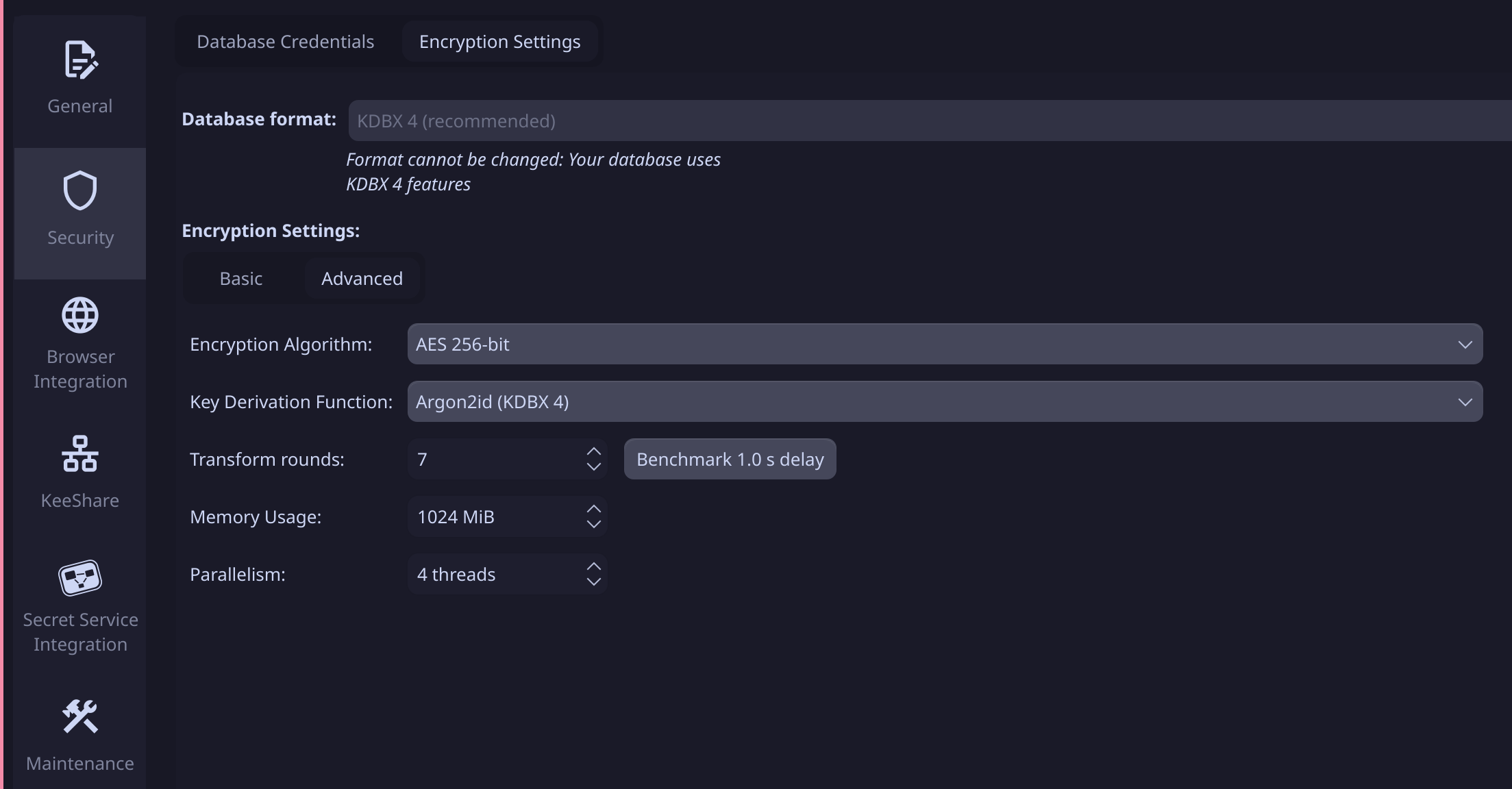
This will make your database as secure as it possibly can be!! If you need to be able to use your database on low powered devices settings the encryption algorithm to ChaCha20 can be okay.
For yubikey setup see the instructions here: https://keepassxc.org/docs/#faq-yubikey-howto
And that’s it
Another Day another step closer to a more secure and private life!! Enjoy
Shadow Out